
The landscape of artificial intelligence is shifting rapidly from isolated model experimentation to the deployment of robust, interconnected agentic systems. With the announcements at Ignite 2025, Microsoft has crystallized this shift with Microsoft AI Foundry – a unified platform designed to be the “AI app and agent factory” for the enterprise.
For AI Engineers, Cloud Architects, and Technical Leaders, the message is clear from Microsoft: the era of simply calling an LLM API is over. The new paradigm is about orchestrating fleets of agents, managing them securely, and integrating them deeply with business data.
The Cloud Architecture Shift: From PaaS to Control Plane
To understand Microsoft Foundry changes, we must look at how the cloud architecture for AI has evolved.
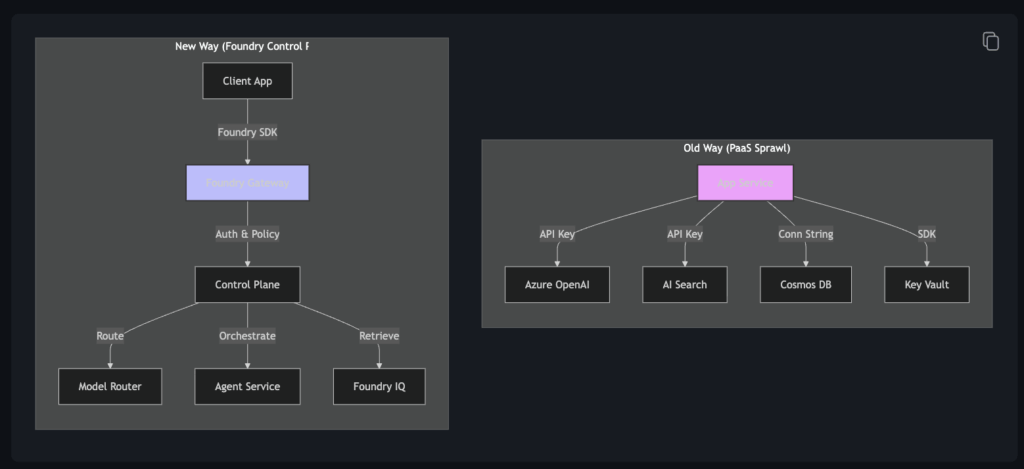
The Old Way (PaaS-Heavy):
Previously, building an AI solution meant stitching together discrete Azure PaaS resources. You provisioned an Azure OpenAI resource here, an AI Search service there, a Container App for hosting, maybe some storage account to hold RAG data and a Key Vault for secrets. You were responsible for the “glue” code that connected them, the networking between them, and the individual monitoring and alerts of each component. It was flexible but operationally heavy. Microsoft introduced AI Foundry earlier next this year but it has been a mixed bag, it contained some control elements and logging/monitoring but still the way to do something was stitching these services together in custom code.
The New Way (Control Plane-Centric):
Foundry introduces a “Control Plane” architecture. While the underlying resources (like hubs and projects) still exist, your primary interaction shifts to a higher level of abstraction. Everything related to AI is now managed on top of Foundry endpoints.
Instead of managing raw API calls between services, you route traffic through the Foundry Gateway. This centralized entry point handles:
- Identity & Security: Automatically enforcing Entra ID (formerly Azure AD) policies and inspecting traffic with Microsoft Defender.
- Routing: Dynamically sending requests to the best model or agent.
- Observability: Aggregating logs and traces from a distributed system into a single view.
This shift moves AI architecture closer to a SaaS-like experience where the platform handles the “plumbing,” allowing architects to focus on the “flow” of intelligence.
Deep Dive: New Features & Capabilities
Microsoft AI Foundry has introduced a suite of tools to support this agentic future. Let’s explore what these capabilities mean for your architecture and when you should deploy them.
1. Foundry Agent Service: The Serverless Runtime
The Foundry Agent Service represents a fundamental shift in how we host AI logic. Under the hood, it abstracts away the complexity of managing containers (likely Azure Container Apps or Kubernetes) and provides a fully managed “control loop” for your agents.
For developers, this means Zero Ops. You no longer need to write Dockerfiles, manage K8s manifests, or configure scaling rules—the service scales to zero automatically. Crucially, it solves the “memory problem” by providing a built-in state store (backed by high-performance storage like Cosmos DB or Redis), allowing your agents to persist conversation threads and execution states without you provisioning separate databases.
However, this abstraction comes with trade-offs. The service can feel like a “black box” compared to a container you own, making debugging complex crashes more challenging. There is also the potential for “cold starts” if your agent sees infrequent traffic. But for most simple enterprise use cases, the reduction in operational overhead and the built-in integration with Entra ID for security make it the default choice for basic agentic workloads.
2. Foundry IQ: Reasoning, Not Just Retrieval
We are moving beyond “dumb RAG” (Retrieval-Augmented Generation). Standard RAG often fails at multi-hop queries—like “Compare the revenue of Q1 2023 vs Q1 2024″—because a simple vector search can’t find a single document that contains the answer.
This has been now in the past year and a halve been counteracted by multi-hop RAG, query re-write, agentic rag in the application itself. But now Microsoft released the Foundry IQ for it.
Foundry IQ solves this by introducing an agentic reasoning loop, which we have previously implemented ourselves in the custom applications. Instead of a single lookup, it acts as an orchestrator on top of Azure AI Search. It breaks a complex user query into sub-questions, executes multiple searches (combining keyword and vector strategies), and uses an LLM to synthesize the results. It effectively “plans” its retrieval strategy.
This dynamic approach yields significantly higher accuracy for complex business questions. The trade-off is latency and cost: a reasoning loop involves multiple LLM calls and search queries, making it slower and more expensive than a simple vector lookup. It is best used for high-value, complex knowledge retrieval tasks rather than simple FAQ bots.

Based on my testing, the solution partially works but is not fully reliable. It’s better than of course as a pure vector search, but not as good as a custom self-build agentic rag. It lacks domain specificity in the search. I see that it will be good off-the-self rag for a quick POC’s or MVP on fields which do not require that much domain specificity.
One nice thing for the Foundry IQ is that it contains a lot of connectors and handles quite nicely the multi-index queries with little overhead. It seems to be an easy option that can get you started with agentic rag, without focusing the rag part that much if you have the money.
3. Model Router: Optimizing the “Iron Triangle”
Architects constantly balance the “Iron Triangle” of AI: Cost, Latency, and Quality. The Model Router automates this optimization by acting as a smart reverse proxy.
It analyzes the complexity of every incoming prompt using a lightweight classifier. Simple tasks—like “hello” or basic classification—are routed to faster, cheaper models, potentially saving 30-50% on inference bills. Complex reasoning tasks are automatically upgraded to frontier models.
This “set and forget” optimization allows you to get the best of both worlds without writing complex routing logic in your application code. The only downside is a potential variance in response style depending on which model picks up the request, which can complicate strict regression testing.
4. Foundry Tools & MCP
Perhaps the most strategic addition is the support for the Model Context Protocol (MCP). This open standard allows you to write a tool—like a “Check Inventory” function—once and share it across every agent in your organization, regardless of the underlying model or framework.
Foundry Tools acts as a secure registry for these capabilities. You can register pre-built tools (like Bing Search), custom tools wrapping your internal APIs, or partner connectors to systems like Salesforce. This promotes a “write once, use everywhere” philosophy and allows security teams to apply granular policies on who can use which tool. While the ecosystem is still maturing, adopting MCP now positions your architecture for maximum interoperability.
5. An AI-Ready Data Foundation
Agents are only as good as the data they can reason over. Ignite 2025 introduced two critical database evolutions designed specifically for this new era.
Azure HorizonDB:
This is a new, high-performance PostgreSQL-compatible database built for the AI era. It’s not just a database; it’s an intelligent data store with integrated model management. You can manage embeddings and reranking models directly within the database, eliminating the need for complex external ETL pipelines.
- Scale-Out Architecture: Designed for massive scale, it supports distributed tables and high-throughput ingestion, making it ideal for the “Zero-ETL” pattern where operational data is instantly available for AI reasoning.
- Why it matters: It simplifies the “RAG stack” by bringing the AI models closer to the data, reducing latency and complexity.
Azure DocumentDB:
A fully managed, fast, and scalable NoSQL database with native vector search capabilities, compatible with MongoDB.
- The AI Angle: It now supports Float16 vector embeddings, which reduces storage costs by 50% and speeds up vector ingestion without sacrificing retrieval quality.
- Native MCP Integration: It integrates deeply with the Model Context Protocol (MCP), allowing agents to query document stores natively. This effectively turns DocumentDB into a high-performance “long-term memory” for your agent fleet.
6. Role-Based Access Control in AI Foundry: Aligned with AI Responsibilities
Microsoft AI Foundry introduces RBAC (Role-Based Access Control) to ensure secure and organized access to AI resources. What makes this implementation unique is how it aligns permissions with AI-specific roles and workflows rather than generic infrastructure roles.
Two Levels of Access
- Account Level – Governs infrastructure such as networking, managed identities, and policies.
- Project Level – Focused on building and managing AI solutions like agents, evaluations, and deployments.
Built-In AI Roles
- Azure AI User
Read-only access to AI projects and accounts, suitable for analysts or stakeholders who need visibility without modification rights. - Azure AI Project Manager
Enables project-level management, including building and developing AI solutions. Ideal for data scientists or AI developers leading a project. - Azure AI Account Owner
Full control over AI accounts and projects, including assigning roles. Typically for administrators or platform owners. - Azure AI Owner (coming soon)
Combines account and project-level permissions for end-to-end AI lifecycle management.
Please note! Applying some roles might limit UI functionality in the Foundry portal for other users. For example, if a user’s role doesn’t have permission to create a compute instance, the option to create one isn’t available in the portal. This behavior is expected and prevents the user from starting actions that return an access denied error.
Enhanced Monitoring & Tracing: No More Black Boxes
Debugging a probabilistic system is hard. Standard APM tools (like App Insights) show you that a call was made, but not why.
Foundry adds GenAI Tracing:
- Trace the Thought Loop: You can see the internal monologue of the agent. Why did it choose tool A? Why did it reject document B?
- Evaluation: It’s not enough to monitor uptime. Foundry allows for continuous evaluation. You can run a subset of production traffic against a “Golden Dataset” to ensure your agent’s accuracy isn’t drifting over time.
The APIM Integration: Bridging Legacy and AI
For Architects is the integration between Azure API Management (APIM) and Foundry.
You can now expose any existing API managed in APIM as an MCP Tool. This means your legacy billing system, your custom inventory microservice, or your internal HR API can be instantly “tool-ified” and made available to your AI agents.
This solves the “last mile” problem of AI integration. Instead of rewriting business logic for your agents, you simply give them access to the tools that already run your business.
The Operational Challenge: IaC vs. ClickOps
While the features are impressive, they introduce a new operational reality that Cloud Engineers must navigate: the tension between Infrastructure as Code (IaC) and “ClickOps”.
The IaC Part:
You can (and should) still use Terraform, Bicep, or Pulumi to provision the “hard” resources:
- Foundry Hubs and Projects
- Storage Accounts, Key Vaults
- Managed Identity assignments
- Network isolation (VNet’s, Private Endpoints, DNS zones etc.)
The ClickOps Part:
However, the behavior of the AI—configuring the Model Router thresholds, setting up the specific instructions for a hosted agent, or managing the prompt evaluations—often lives inside the Foundry Portal. These configurations are dynamic and experimental by nature.
The Shift:
We are moving from a world of “Self-managed code + IaC” to a hybrid of “Managed Platform + ClickOps + Code”.
- Challenge: How do you version control a Model Router configuration that was tweaked in the UI?
- Solution: The industry is still maturing here. The best practice today is to use the AIProjectClient SDK to script these configurations where possible, treating your agent configuration as code, even if the platform encourages UI interaction. Mixing now ClickOps, IaC code and now python/C# code is a bit of a mess and will be a challenge to maintain.
Code Examples: The New SDK
The new azure-ai-projects SDK unifies these capabilities. Here is how you interact with the Foundry Control Plane in Python.
1. Initializing the Client
Instead of managing separate clients for OpenAI, Search, and Storage, you instantiate a single AIProjectClient.
from azure.ai.projects import AIProjectClient
from azure.identity import DefaultAzureCredential

project_connection_string = "endpoint=https://<region>.api.azureml.ms;subscription_id=...;resource_group=...;project_name=..."

project = AIProjectClient.from_connection_string(
    conn_str=project_connection_string,
    credential=DefaultAzureCredential()
)
2. Creating and Running a Hosted Agent
Deploying an agent to the serverless runtime is declarative.
# Create an agent with access to a Code Interpreter tool
agent = project.agents.create_agent(
    model="gpt-5.1",
    name="data-analyst-agent",
    instructions="You are a data analyst. Use code to visualize trends.",
    tools=[{"type": "code_interpreter"}],
)

# Run the agent on a thread
thread = project.agents.create_thread()
message = project.agents.create_message(
    thread_id=thread.id,
    role="user",
    content="Analyze the uploaded sales_data.csv and plot the revenue trend."
)

run = project.agents.create_run(thread_id=thread.id, assistant_id=agent.id)
# ... poll for completion ...
3. Foundry IQ (Reasoning Loop)
To use the reasoning engine with your data, you pass the data_sources configuration.
# The "extra_body" parameter triggers the Foundry IQ orchestration
response = project.inference.chat.completions.create(
    model="gpt-5.1",
    messages=[{"role": "user", "content": "Why did our Q3 margin drop?"}],
    extra_body={
        "data_sources": [
            {
                "type": "azure_search",
                "parameters": {
                    "endpoint": "https://<search-service>.search.windows.net",
                    "index_name": "financial-reports",
                    "authentication": {"type": "system_assigned_managed_identity"}
                }
            }
        ]
    }
)
4. Infrastructure as Code (Terraform)
Since Foundry resources are built on top of Cognitive Services, the most reliable way to provision them today is using the azapi provider, which gives you access to the latest API features before they land in the standard azurerm provider.
Provisioning a Foundry resource:
## Create the AI Foundry resource
##
resource "azapi_resource" "ai_foundry" {
  type                      = "Microsoft.CognitiveServices/accounts@2025-06-01"
  name                      = "aifoundry${random_string.unique.result}"
  parent_id                 = azapi_resource.rg.id
  location                  = var.location
  schema_validation_enabled = false
  body = {
    kind = "AIServices"
    sku = {
      name = "S0"
    }
    identity = {
      type = "SystemAssigned"
    }
    properties = {
      # Support both Entra ID and API Key authentication for Cognitive Services account
      disableLocalAuth = false
      # Specifies that this is an AI Foundry resourceyes
      allowProjectManagement = true
      # Set custom subdomain name for DNS names created for this Foundry resource
      customSubDomainName = "aifoundry${random_string.unique.result}"
    }
  }
}
Provisioning a deployment model:
## Create a deployment for OpenAI's Claude Sonnet 4.5 in the AI Foundry resource
##
resource "azapi_resource" "aifoundry_deployment_claude_sonnet_4_5" {
  type      = "Microsoft.CognitiveServices/accounts/deployments@2023-05-01"
  name      = "claude-sonnet-4-5"
  parent_id = azapi_resource.ai_foundry.id
  depends_on = [
    azapi_resource.ai_foundry
  ]
  body = {
    sku = {
      name     = "GlobalStandard"
      capacity = 1
    }
    properties = {
      model = {
        format  = "OpenAI"
        name    = "claude-sonnet-4-5"
        version = "20250929"
      }
    }
  }
}
Provisioning a Project:
## Create AI Foundry project
##
resource "azapi_resource" "ai_foundry_project" {
  type                      = "Microsoft.CognitiveServices/accounts/projects@2025-06-01"
  name                      = "project${random_string.unique.result}"
  parent_id                 = azapi_resource.ai_foundry.id
  location                  = var.location
  schema_validation_enabled = false
  body = {
    sku = {
      name = "S0"
    }
    identity = {
      type = "SystemAssigned"
    }
    properties = {
      displayName = "project"
      description = "My first project"
    }
  }
}
Strategic Decision: Foundry vs. Custom
With these powerful capabilities comes a strategic choice for technical leaders: When should you go “all-in” on Foundry, and when should you build a custom solution?
When to Choose Foundry (The “Fleet” Approach):
- Speed to Market: You need to ship an agentic application now. The pre-built agents, hosted runtime, and integrated tool catalog will save months of boilerplate engineering.
- Governance is Critical: If you are in a regulated industry (Finance, Healthcare), the deep integration with Entra ID and Defender for Cloud provides a security posture that is incredibly hard to replicate with custom code.
- Fleet Management: You expect to have tens or hundreds of agents. Managing them individually is a nightmare; Foundry’s Control Plane is essential here.
When to Consider a Custom Approach:
- Extreme Cost Optimization: For massive-scale consumer apps where every millisecond and millicent counts, the managed service premium of Foundry might add up. Running bare-metal models on AKS or specialized inference endpoints might be cheaper at scale.
- Bleeding Edge / Niche Models: If you need to use a brand-new research model that isn’t yet in the Foundry Model Catalog, or requires highly specialized custom CUDA kernels, a custom containerized approach gives you that flexibility.
- Vendor Lock-in Concerns: If your organization mandates strict multi-cloud portability (e.g., “must run on AWS and Azure with zero code changes”), relying heavily on Foundry’s specific agent runtime might create friction.
Microsoft AI Foundry is an exciting new offering, but it’s important to note that the current release is still in preview. This means certain enterprise-grade features—such as end-to-end network isolation is not supported in the new Foundry portal experience. Please use the classic Foundry portal experience or the SDK or CLI to securely access your Foundry projects when network isolation is enabled.
Use Cases: From Creation to Orchestration
The platform supports the full lifecycle of agentic AI, but perhaps the most interesting design choice is how it bridges the gap between business users and engineers.
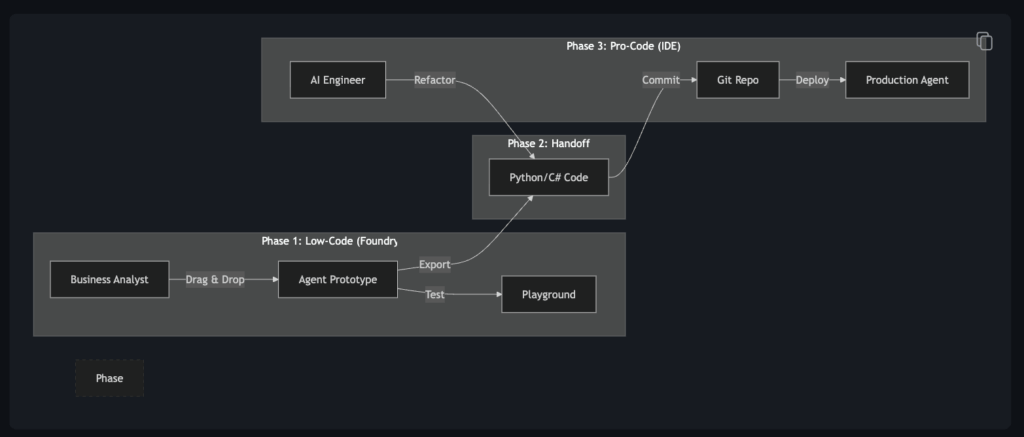
Bridging the Gap: Low-Code to Pro-Code
Foundry introduces a unified workflow that allows for a seamless transition from prototyping to production engineering.
- The Workflow: A business analyst can start in the Foundry Portal (Low-Code), using a visual interface to drag-and-drop an agent flow, test prompts, and select tools.
- The Shift: Once the prototype is validated, an engineer can export this exact flow into code (Python/C#).
- The Optimization: Now in “Pro-Code” mode, the engineer can apply software engineering rigor—unit tests, CI/CD pipelines, and performance optimizations—without having to rebuild the logic from scratch.
This capability is a good for business teams to get quickly going and test with a little bit more challenging problems, but also when the development comes official easier to devs to start working on it. It turns business-led prototyping into a valid first step of the engineering lifecycle, rather than a throwaway effort.
Core Capabilities
- Agent Creation: Developers can build agents using the Microsoft Agent Framework (the evolution of Semantic Kernel and AutoGen) or their preferred open-source frameworks.
- Flow Creation: Design complex workflows where agents collaborate. For example, a “Supply Chain Flow” might involve an Inventory Agent checking stock, a Procurement Agent requesting quotes, and a Manager Agent approving the purchase.
- Orchestration: Once deployed, you manage these agents as a fleet. You can update them, monitor their health, and scale them up or down based on demand, all from the Foundry portal.
Conclusion
Microsoft AI Foundry 2025 represents a maturity milestone for Generative AI. It moves the Microsoft Azure ecosystem into the era of engineered, governed, and scalable AI systems. For architects and engineers, the task is now to leverage these Foundry endpoints to build the intelligent nervous system of the modern enterprise—navigating the new balance between managed services and custom engineering.
Of course in the end this is a PaaS offering, so it is not a replacement for custom engineering, but it is a tool that can help you build more less complex applications faster.
References & Further Reading
- Ignite 2025 Announcement: Azure at Microsoft Ignite 2025: All the intelligent cloud news explained
- Microsoft Foundry Updates: Introducing Claude Opus 4.5 in Microsoft Foundry
- SDK Documentation: Azure AI Projects Client Library for Python
- MS AI Foundry documentation: What is Microsoft Foundry?
Ignite 2025 Sessions you might want to check
- BRK130: The blueprint for intelligent AI agents backed by PostgreSQL
- BRK391: Accelerating Media Innovation with AI Agents
- BRK1706: Build&Manage ai apps with your agent factory
- BRK195: Making smarter model choices: Anthropic, OpenAI & More on Microsoft Foundry
- BRK194: Driving agentic innovation with MCP as the backbone of tool-aware AI
- BRK189: AI agents in Microsoft Foundry, ship fast, scale fearlessly
- BRK205: AI Operations to own the fleet, master the mission in Microsoft
- BRK187: AI Playbook for ROI with Microsoft Foundry
ft Foundry
Technical Repositories
- Official Samples: Azure-Samples/azureai-samples
- Agent Samples: Azure-Samples/ai-foundry-agents-samples
- Travel Agent Demo: Azure-Samples/azureai-travel-agent-python